
Compress videos from GB to MB and keep its original quality with the AI technology
How to Remove Video Watermark on All Devices [Updated 2026]

Posted by Aira Lesly Escoto to Edit Video/Audio Apr 03, 2026
Sometimes, when you save a video after using editing tools, various watermarks may appear, making the video look blurry. However, with the right watermark removal tool, you can easily solve this problem-whether it’s a social media video or a trial watermark, you can effectively remove them. This article provides seven methods for removing watermarks from videos. Each method includes detailed steps, covering software programs, online tools, and apps for iPhone and Android devices.
Guide List
Quick List to Check the Features of these Tools Best Way to Remove Watermark with AI on Windows and Mac Remove Video Watermark in 3 Online Tools How to Use iPhone/Android to Remove Watermarks in VideoQuick List to Check the Features of these Tools
After comprehensive testing, we’ve selected seven watermark removal tools available across different devices, including both dedicated applications and web-based solutions. Before diving into each option in detail, here’s a quick comparison of the online and offline tools we’ve chosen.
| Tool | Platform | Supported Formats | Output Quality | Batch Processing | Ease of Use |
| 4Easysoft Total Video Converter | Windows / Mac | 1000+ formats like MP4, MOV, AVI, MKV, WMV, etc. | Up to 4K/8K | √ | Easy |
| Shotcut | Windows / Mac / Linux | Common formats (FFmpeg-supported) | Up to 4K | √ | Medium |
| Media.io | Web-based | MP4, MOV, M4V, 3GP, etc. | HD | √ | Easy |
| VEED.io | Web-based | MP4, MOV | Up to 1080p | × | Easy |
| 123apps Video Watermark Remover | Web-based | MP4, MOV, AVI | Up to 1080p | × | Very Easy |
| Remove & Add Watermark | Android | MP4, AVI, MOV | Up to 1080p | √ | Easy |
| Video Eraser | iOS | MP4, MOV | Up to 1080p | × | Very Easy |
Best Way to Remove Watermark with AI on Windows and Mac
1.4Easysoft Total Video Converter
Whether you're a beginner or a professional, 4Easysoft Total Video Converter makes it easy to remove watermarks. This program leverages AI technology to remove video watermarks and background noise, enhance video quality, and apply color correction with a single click. In addition to basic functions like trimming and reversing, it offers over 15 tools, including a video compressor, GIF creator, and, of course, a video watermark remover. With this simple yet powerful watermark removal software, you can easily remove various types of watermarks from any video.

Video watermark remover effectively removes any text, images, or emojis from videos.
Support exporting in multiple formats, such as MP4, MOV, GIF, and more.
Remove video noise, resulting in clearer, higher-quality footage.
The "Reduce Video Shake" feature effectively stabilizes shaky footage.
100% Secure
100% Secure
Step 1Launch 4Easysoft Total Video Converter and click Toolbox. There, you will see over 15 tool kits offered by the program. Click "Video Watermark Remover".
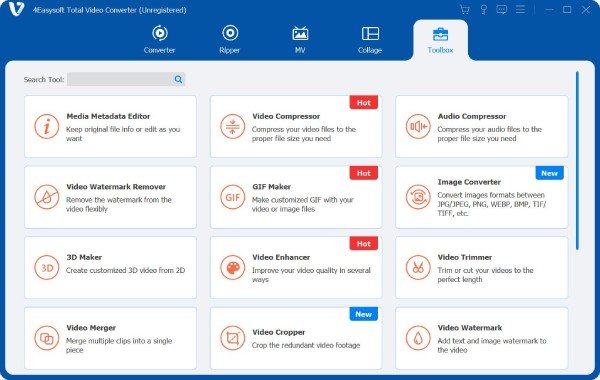
Step 2Add the video you wish to remove the watermark from by clicking the "Plus" button. Click the "Add watermark removing area" button, then drag the frame or enter the number to adjust the size.
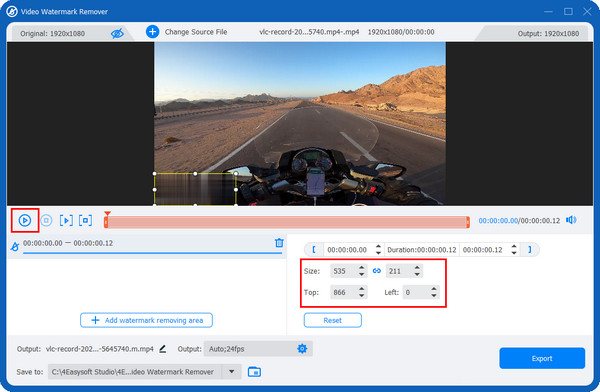
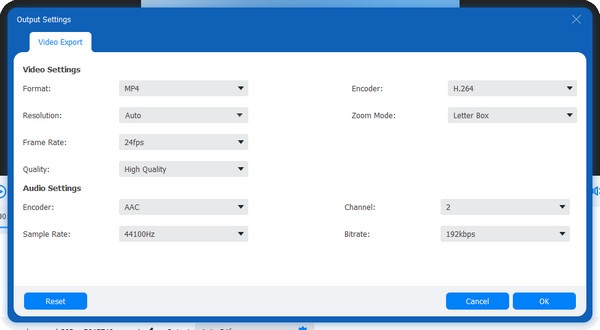
Step 3Click the "Play" button on the left side to preview the video. You can change the output and adjust other video settings by clicking "Settings". Once done, click Export; to get your watermark-free video.
2.Shotcut
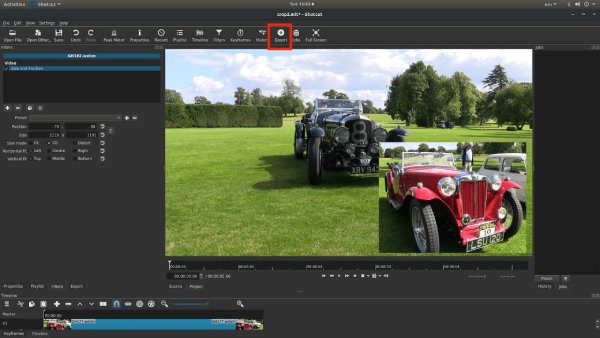
Shotcut is an open-source video editor that removes watermarks primarily through cropping, overlaying, and filter-based techniques rather than AI reconstruction. It supports a wide range of formats via FFmpeg, allows frame-level editing on a timeline, and enables precise positioning for masking or covering unwanted areas. While it offers batch export and high-resolution output, the workflow is relatively manual.
Step 1Click "Open File" to import the video, then drag it onto the timeline. If the timeline isn’t visible, click the "Timeline" button to enable the editing interface.
Step 2Click "Filters", then click the "+" to add a filter. Choose either "Crop: Source" to crop out the watermarked area, or "Blur" to blur the watermarked area. Fine-tune the parameters in the right-hand panel to ensure the watermarked area is fully processed.
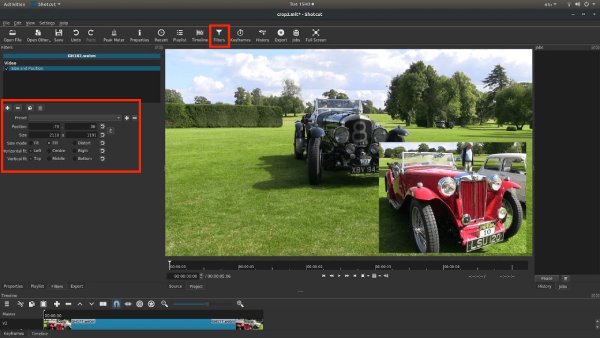
Step 3Finally, click "Export", select a resolution (such as 1080p or 4K), choose a save location, and export the processed video.
Remove Video Watermark in 3 Online Tools
If you need to make adjustments across multiple devices, online tools are a good option. However, some online tools may not fully meet all your needs or guarantee complete removal of watermarks. Their advantages are that they are convenient and require no downloads.
1.Media.io
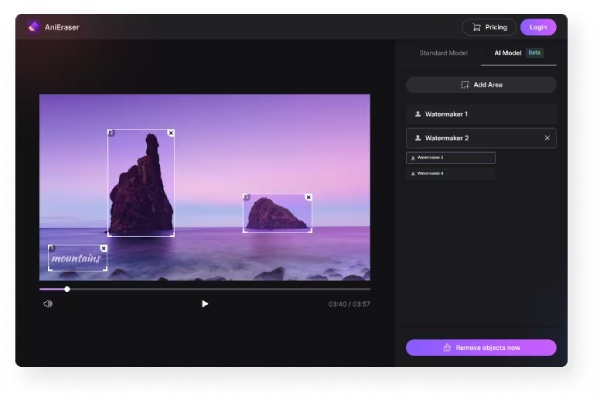
Media.io is an AI-powered online video watermark removal tool that automatically identifies and removes watermarked areas. Using intelligent filling technology, it preserves the integrity and clarity of the video after removal, while supporting multiple formats such as MOV, M4V, and 3GP.
- Pros
- Support AI-powered automatic watermark detection, reducing the need for manual intervention.
- Image quality remains good after removal, with virtually no noticeable blurring.
- Cons
- The free version has limits on the number of uses or duration.
- Processing time may vary depending on network and server conditions.
- Minor imperfections may occur in intricate or detailed backgrounds.
2.VEED.io
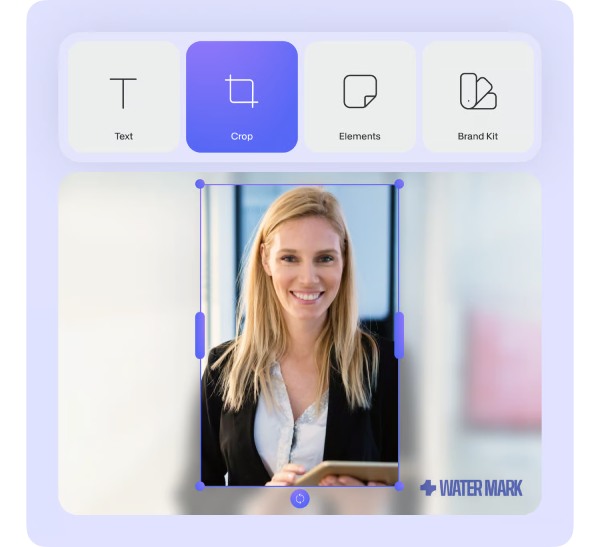
VEED.io is more of an online editor to edit video; its "watermark removal" feature primarily works by cropping, overlaying elements, or adding text. Essentially, it masks the watermark rather than actually removing it, making it suitable for quickly handling watermarks in specific, localized areas.
- Pros
- Easy to use with a user-friendly interface, perfect for beginners.
- Includes a variety of video editing features (subtitles, stickers, etc.).
- Ideal for quickly editing videos for social media.
- Cons
- Cannot remove watermarks; the main methods involve cropping or overlaying.
- Batch processing capabilities are limited.
- Export from the free version typically includes watermarks or has significant restrictions.
3.123apps Video Watermark Remover
123apps Video Watermark Remover is an online video watermark removal tool that requires no download or installation. By selecting the watermark area, you can blur or cover logos, subtitles, or timestamps in your videos. It supports importing common formats such as MP4, MOV, and AVI. The tool is easy to use and includes basic editing features like trimming and cropping, making it ideal for quickly removing simple watermarks.

- Pros
- Easy to use, so even beginners can quickly remove watermarks.
- Integrate a variety of online editing tools, including trimming, cropping, and conversion.
- Support export resolutions up to 4K.
- Cons
- Blurring or masking can leave visible traces that affect image quality.
- Cannot effectively handle dynamic or complex watermarks.
- Support exporting a maximum of five files per day.
How to Use iPhone/Android to Remove Watermarks in Video
In addition to software and online tools that can remove watermarks, there are also mobile apps that can do the same. Here are two apps available for download from the App Store and Google Play that you can use to remove video watermarks on your iPhone or Android device.
1.Video Eraser
Video Eraser is a mobile video watermark remover for iPhone. It allows you to manually select and remove logos, text, or icons from videos. It also includes features such as cropping, adding watermarks, and basic editing.

- Pros
- All-in-one editing features, including watermark removal and cropping, etc.
- Support both video and image processing, making it suitable for a wider range of scenarios.
- Local processing on mobile devices ensures better privacy.
- Cons
- Performance may be inconsistent when handling complex or animated watermarks.
- Processing speed is relatively slow for high-resolution files.
- The app has a low rating, and there is some controversy regarding its stability and results.
2.Remove & Add Watermark
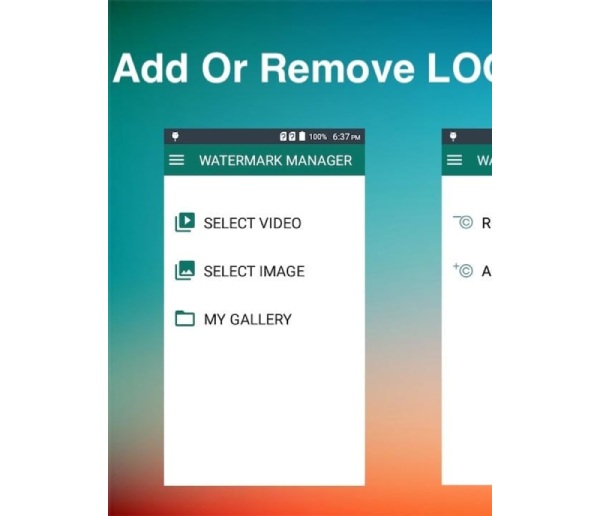
For Android users, Remove & Add Watermark is a good watermark remover. It focuses more on a "combined removal and addition" approach, allowing you to manually select watermark areas and perform batch processing.
- Pros
- Support batch processing of videos to improve efficiency.
- Completely free to use.
- Support overlaying text, icons, and custom watermarks.
- Cons
- Removal relies on manual input and offers limited automation.
- Performance is limited when dealing with complex backgrounds or moving watermarks.
- Image quality control is limited, and blurring or artifacts may occur.
Conclusion
As you’ve learned here, you don’t need any special skills or video editing experience to remove watermarks from your videos. All you need to do is choose the right watermark removal tool! You can use online tools and apps designed for iPhone and Android devices to quickly remove watermarks from your videos. For high-quality watermark removal, use the best software, 4Easysoft Total Video Converter. It not only converts formats and edits videos to remove watermarks, but also offers a variety of other features, such as cropping and adding filters. Download it now to experience its features!
100% Secure
100% Secure
